

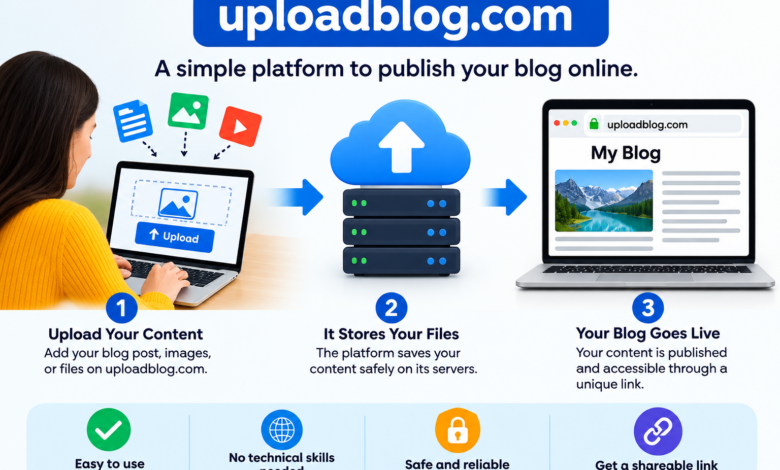
Online publishing is growing fast every day. Many writers, marketers, and business owners want to share their ideas on the web. However, building a website from scratch takes a lot of time. It also costs money and requires technical skills. Web hosting, domain setup, and website maintenance can feel overwhelming for beginners.
This is where platforms like UploadBlog.com come into play. But what is uploadblog.com and how does it work?
UploadBlog.com is a free online publishing and blogging platform. It allows users to write, publish, and share articles without managing complex website technology. Whether you are a student, a freelance writer, or a digital marketer, UploadBlog.com gives you a simple way to launch your content online.
In this complete guide, you will learn everything about UploadBlog.com, its core features, how it works, and how you can use it to grow your online presence.
Understanding UploadBlog.com
UploadBlog.com works as a guest blogging and content publishing hub. It removes the technical barriers that stop many people from starting a blog. Instead of setting up databases or buying custom domains, you can focus purely on writing and publishing your ideas.
The platform caters to a diverse group of online creators:
- Beginner Bloggers: People who want to practice writing without spending money on web hosting.
- Freelancers and Authors: Content creators who need a simple online portfolio to showcase their work to clients.
- Digital Marketers: SEO specialists and agencies looking for guest posting and content distribution opportunities.
- Small Business Owners: Entrepreneurs who want to share helpful articles to attract potential customers.
Key Features of UploadBlog.com
UploadBlog.com provides several built-in tools that make article creation smooth and fast. You do not need any coding knowledge to use these features.
1. Simple Visual Editor
The platform uses a WYSIWYG (What You See Is What You Get) text editor. This editor works just like Microsoft Word or Google Docs. You can bold text, add headings, create bullet lists, and format your paragraphs easily.
2. Built-In SEO Settings
Search engine optimization is critical if you want readers from Google. UploadBlog.com provides basic SEO tools that let you optimize article titles, meta descriptions, categories, and tags. These settings help search engines discover and rank your posts.
3. Media and Link Support
Visual content makes articles engaging. The editor allows you to upload high-quality images and embed videos. You can also insert external and internal hyperlinks to build strong content connections.
4. Author Profiles
Every registered user gets a public author profile. You can add a short bio, your profile picture, and links to your social media accounts. This helps you build personal branding and online credibility over time.
5. Categorized Content Hub
Articles on UploadBlog.com fall under distinct categories such as Technology, Business, Finance, Health, Lifestyle, Education, and Travel. Categorization makes it easy for readers to browse topics they care about.
How Does UploadBlog.com Work? Step-by-Step Guide
Using UploadBlog.com is straightforward. You can go from account creation to publishing your first article in just a few minutes. Here is the complete step-by-step process.
       +------------------------------------+
       | 1. Create a Free Account           |
       +------------------------------------+
                         |
                         v
       +------------------------------------+
       | 2. Set Up Your Author Profile      |
       +------------------------------------+
                         |
                         v
       +------------------------------------+
       | 3. Draft & Format Your Content     |
       +------------------------------------+
                         |
                         v
       +------------------------------------+
       | 4. Submit for Editorial Review     |
       +------------------------------------+
                         |
                         v
       +------------------------------------+
       | 5. Publish & Promote Your Post     |
       +------------------------------------+
Step 1: Create a Free Account
- Visit the official website at
www.uploadblog.com. - Click on the Sign Up or Register button.
- Fill in your details, including your email address, username, and password.
- Check your inbox for a verification email and click the confirmation link to activate your account.
Step 2: Set Up Your Author Profile
Before writing, complete your profile details. Add a professional profile picture and write a short, clear bio explaining your background or business. Add your social media links so readers can connect with you outside the platform.
Step 3: Write and Format Your Article
Click on the Create New Post or Add Article button to open the post editor.
- Write a catchy title that includes your target keyword.
- Draft your content using short paragraphs and clear active language.
- Add subheadings ($H2$, $H3$) to break down long text blocks.
- Insert relevant images to enhance visual appeal.
- Assign appropriate categories and tags to your post.
Step 4: Submit Your Article for Review
Once your post is ready, review it for grammar, tone, and readability. Click the Submit button. On UploadBlog.com, articles go through an editorial review process to ensure they follow community guidelines and quality standards.
Step 5: Post Publication and Promotion
After approval, your article goes live on the platform with its own unique URL. You can now copy the link and share it across your social media channels, email newsletters, and professional networks to drive traffic.
Benefits of Using UploadBlog.com
Why should you choose UploadBlog.com over traditional website builders like WordPress or Wix? Here are the main advantages.
| Advantage | Benefit to Writers and Marketers |
| Zero Maintenance | No need to deal with servers, updates, security plugins, or website crashes. |
| Cost Savings | The platform offers free access to publishing tools without hidden costs. |
| Fast Setup | You can publish your first piece of content within minutes of joining. |
| Built-in Audience | Benefit from existing site visitors who browse categories for new posts. |
| Portfolio Building | Easily point prospective clients to clean, hosted content written by you. |
UploadBlog.com vs. Other Publishing Platforms
To help you choose the right platform, here is how UploadBlog.com compares to popular alternatives like Medium and Blogger.
       PUBLISHING PLATFORMS COMPARISON
       ================================
       Platform     | Hosting Fee | Editorial Review
       -------------+-------------+-----------------
       UploadBlog   | Free        | Yes
       Medium       | Free/Paid   | No (Self-pub)
       Blogger      | Free        | No (Self-pub)
- UploadBlog.com vs. Medium: Medium focuses heavily on reader subscriptions and platform-wide distribution. UploadBlog.com focuses more on structured guest posting, niche content organization, and SEO link opportunities.
- UploadBlog.com vs. Blogger: Blogger requires you to manage your own theme layout and blog structure. UploadBlog.com removes theme design entirely so you can focus solely on writing.
Best Practices for Success on UploadBlog.com
To maximize your readership and keep your approval rates high, follow these simple guidelines:
- Write Original Content: Always post unique articles. Avoid copying content from other websites, as duplicate content harms SEO.
- Focus on Quality: Proofread your articles to eliminate grammar and spelling mistakes before submitting.
- Use Active Voice: Keep your sentences clear, direct, and energetic. Active voice improves readability score and audience engagement.
- Include Relevant Keywords: Place your target keyword naturally in the title, intro paragraph, and subheadings without overusing it.
- Add Clear Calls to Action (CTA): End your articles by asking readers a question or encouraging them to leave a comment.
Frequently Asked Questions (FAQs)
Do I need technical or coding skills to use UploadBlog.com?
No. UploadBlog.com features a beginner-friendly visual editor. You do not need any web development or HTML knowledge.
Is UploadBlog.com completely free to use?
Yes, basic registration and article publishing on UploadBlog.com are free.
Can I include links to my website in my articles?
Yes, you can add hyperlinks within your content, provided they add value to the reader and comply with the platform’s content guidelines.
Final Thoughts
Understanding what is uploadblog.com and how does it work opens up new doors for online content creation. It eliminates the technical barriers of traditional blogging, allowing you to publish quality articles quickly. Whether you want to build an writing portfolio, gain online visibility, or distribute content effectively, UploadBlog.com provides a reliable and accessible platform to share your voice.